Turbo Internet Download Manager
One file. Several connections at once.
A free Chrome extension that splits a download across up to 32 connections, resumes where it left off and verifies what it saved. It runs wherever Chrome 116 or later runs — macOS, Windows, Linux and ChromeOS.
What it does
Parallel downloads by default
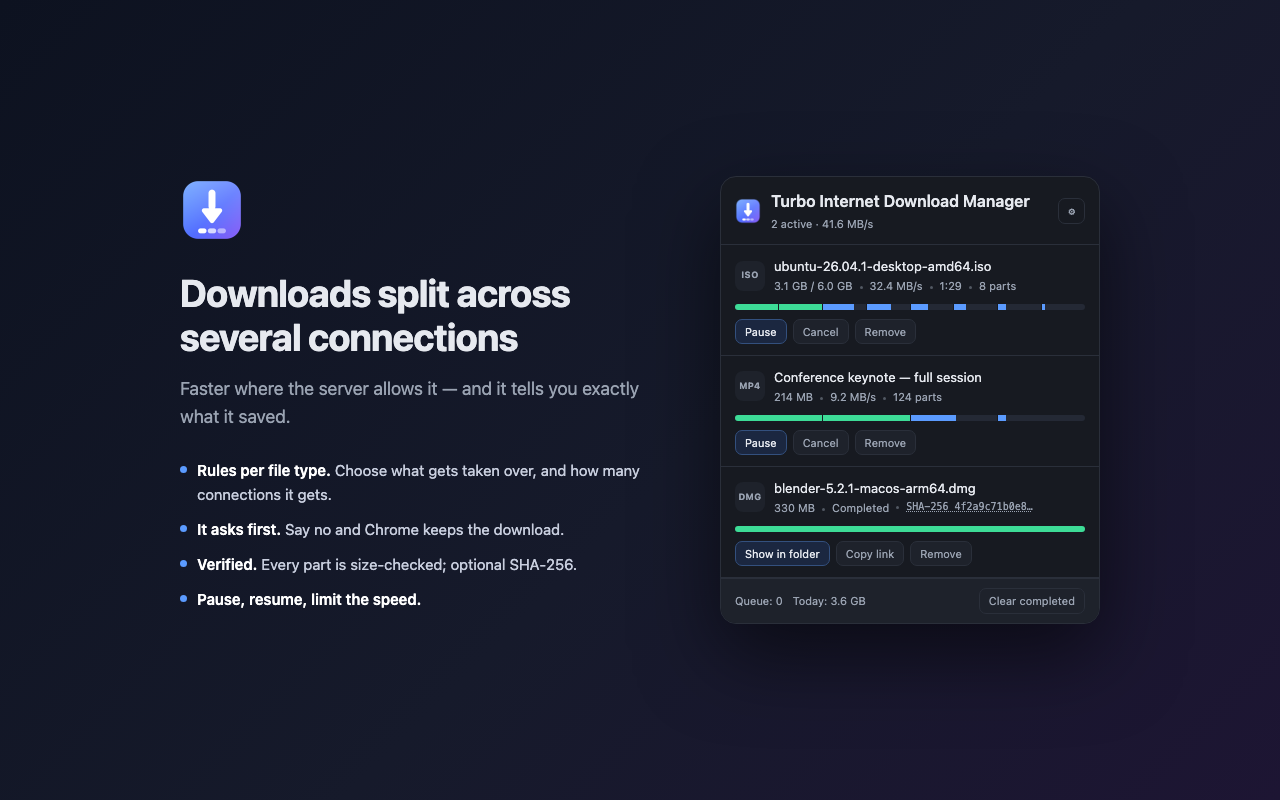
Where the server allows ranged requests, the file is split and fetched over several connections at once, up to 32 parts.
Work stealing
A connection that finishes early takes over half of whichever part has the most left to do, so one slow part cannot hold up the file.
Rules per file type
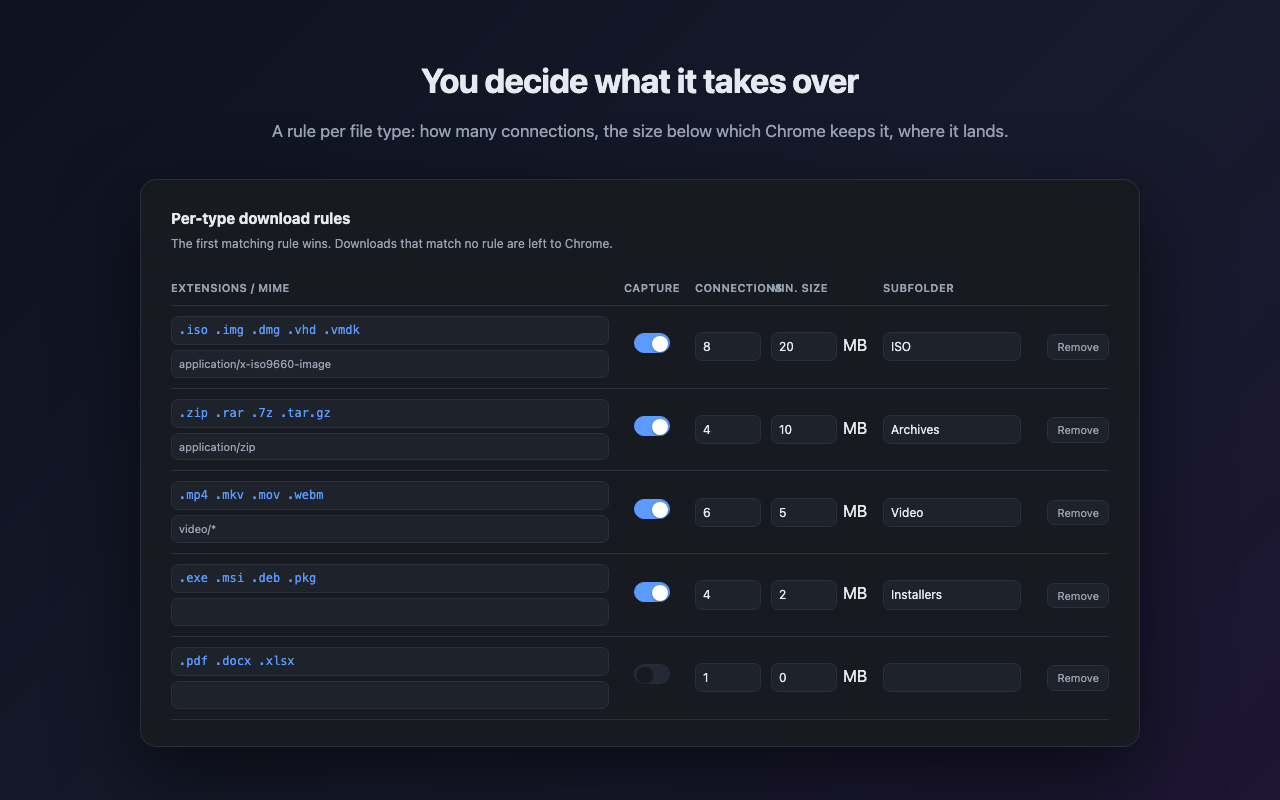
Choose which extensions are taken over, how many connections each gets, a minimum size and a destination subfolder.
It asks first
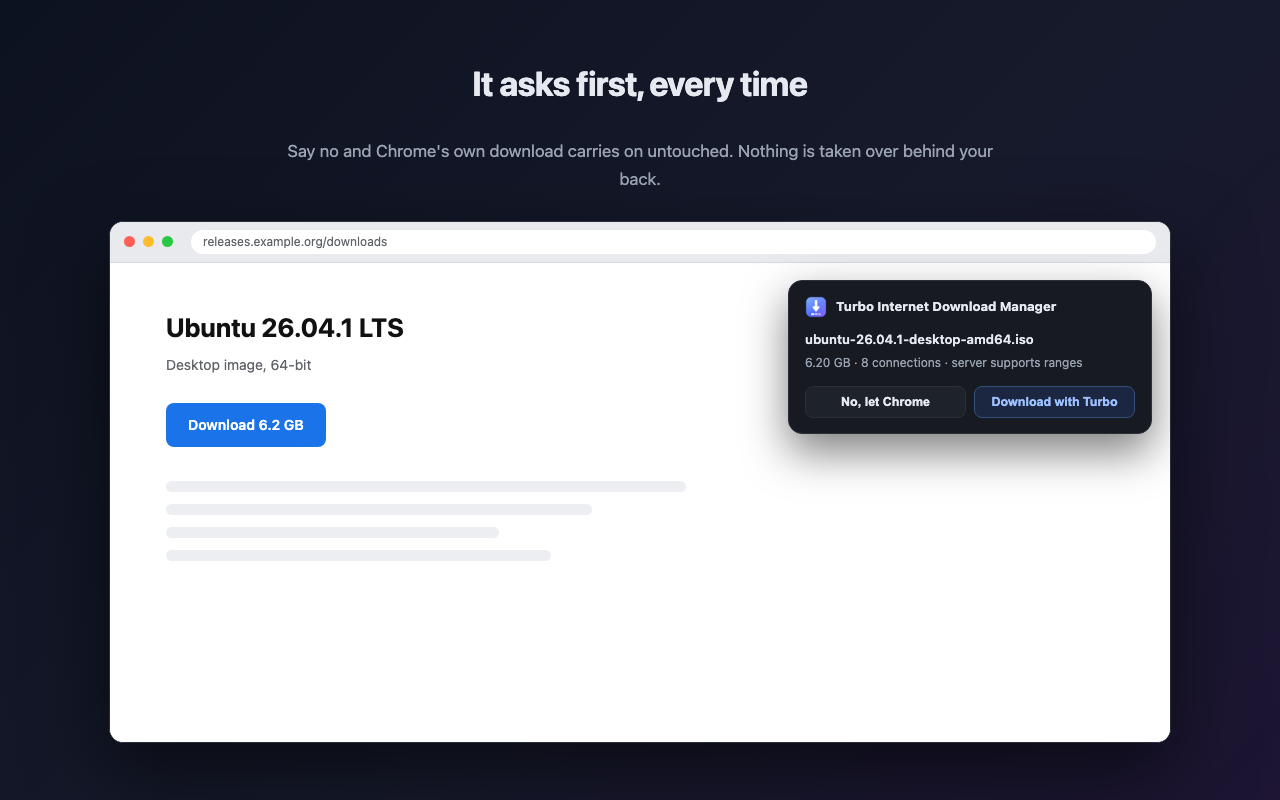
A card appears in the page before anything is taken over. Say no and Chrome keeps the download.
HLS streams to a real MP4
Playlists found on a page become a plain, seekable MP4 with a real sample table. Nothing is re-encoded.
Verified, not just finished
Every part is size-checked before the file is assembled, and SHA-256 is there when you have a published checksum to compare.
What it looks like
Verification
Driven through the Chrome DevTools Protocol against a local server.
- A 10 GB download completed over 32 parts with work stealing active, and the SHA-256 of the result matched the reference file.
- A 6 GB Ubuntu ISO completed with a SHA-256 matching the checksum Ubuntu publishes.
- Ten scenarios pass: ranged, no-range fallback, 1 KB, zero bytes, 404, transient 500, pause, resume, cancel and duplicate suppression.
- HLS: a 64-segment TS stream and a 101-segment fragmented-MP4 stream both produced valid, seekable output.
- A download a server refused with 403 when no
Refererwas sent completed when one was.
Limits
- When a server ignores ranged requests the download falls back to a single connection, and a single-connection download is capped at 1 GB.
- Resuming needs ranged requests. On a server that ignores
Range, resuming restarts the download. - Parts are held in browser storage until the finished file reaches disk, so a 6 GB download temporarily needs about 12 GB free.
- No scheduler, no queue that survives a browser restart, no FTP and no BitTorrent.
- YouTube and comparable platforms are out of scope.
Not Internet Download Manager (IDM) by Tonec
Turbo Internet Download Manager is an unrelated project that happens to share part of a name. IDM by Tonec is a paid, Windows-only desktop application that reaches the browser through a companion integration plugin.
Turbo Internet Download Manager is a free Chrome extension. There is no desktop application and no companion plugin, it runs on macOS, Windows, Linux and ChromeOS alike, and downloads carry the session cookies of the tab you are already signed in with. In exchange it has no scheduler, no persistent queue, and no FTP or BitTorrent support.
Install the download manager in Chrome
Install it from the Chrome Web Store and choose Add to Chrome. Chrome 116 or later is required.
To run it from source instead, open chrome://extensions, turn
on Developer mode, choose Load unpacked and select the
extension folder.
What it will not download
YouTube and comparable platforms are out of scope. Downloading from them breaks their terms of service, and Chrome Web Store policy forbids extensions that do it.
Questions
Is there an internet download manager for Mac?
Turbo Internet Download Manager runs on macOS. It is a Chrome extension, so it runs wherever Chrome 116 or later runs — macOS, Windows, Linux and ChromeOS — with no platform-specific build and no companion application to install. This is worth stating because the better-known product with a similar name, Internet Download Manager (IDM) by Tonec, is a Windows-only desktop application and is unrelated to this project.
How is it different from Internet Download Manager (IDM) by Tonec?
Turbo Internet Download Manager is an unrelated project that happens to share part of a name. IDM by Tonec is a paid Windows-only desktop application that reaches the browser through a companion integration plugin. Turbo Internet Download Manager is a free Chrome extension: there is no desktop application, no companion plugin, and it runs on macOS, Windows, Linux and ChromeOS alike.
Is it free?
Turbo Internet Download Manager is free. There is no paid tier, no trial period, no licence key and no account to create.
Does it need a companion or helper application?
No. Turbo Internet Download Manager is a single Chrome extension. It hooks Chrome's own download event and does its fetching inside the browser, so there is nothing installed alongside Chrome and nothing left running once the browser is closed.
Does it actually make downloads faster?
Turbo Internet Download Manager makes a download faster when a single connection is the bottleneck, which is common on servers that throttle per connection and on long-distance links where latency limits throughput. It does nothing when your own line is already saturated, and nothing when the server refuses ranged requests, in which case the download falls back to a single connection.
How many connections does it use?
Turbo Internet Download Manager splits a file into parts and fetches each on its own connection, up to 32 parts, with the count configurable per file type. A connection that finishes early takes over half of whichever part has the most left to do, so the tail of a download does not wait on one slow part. Splitting stops when under 2 MB remains, and a part already 90 percent done is left alone.
Can it resume a broken download?
Turbo Internet Download Manager resumes a broken download wherever the server supports ranged requests. Each part retries on its own with exponential backoff, and every part request carries If-Range with the file's ETag or Last-Modified, so a file cannot be stitched together from two different builds. On a server that ignores Range, resuming restarts the download.
Does it work with files behind a login?
Yes. Turbo Internet Download Manager carries the browser's own cookies, so anything you can reach while signed in downloads normally. Referer is set through a declarative session rule rather than through fetch, which cannot set it, so hotlink-protected servers that answer 403 without a referrer work as well.
Can it download videos from a website?
Turbo Internet Download Manager downloads HLS streams that a page actually loads, including TS and fragmented MP4 segments, EXT-X-MAP, EXT-X-BYTERANGE and AES-128 transport encryption. TS streams are converted to a plain, seekable MP4 with a real sample table, so ordinary desktop players open them. Nothing is re-encoded. SAMPLE-AES and anything Widevine-backed are refused.
Does it work with YouTube?
No, deliberately. YouTube and comparable platforms are out of scope for Turbo Internet Download Manager, because downloading from them breaks their terms of service and Chrome Web Store policy forbids extensions that do it.
Is it safe, and what data does it collect?
Turbo Internet Download Manager collects no data and sends nothing to its publisher. There is no backend service to send anything to. Files travel straight from the origin server to your disk, and are never proxied through anyone else.
Why does it need access to every site?
To download a file Turbo Internet Download Manager has to be able to fetch from the site the file is on, which is any site you download from. The same access lets it notice HLS playlists a page loads. Nothing else is read from pages, and the clipboard features that watch for copied links can both be switched off.
Can I limit the download speed?
Yes. Turbo Internet Download Manager has a speed cap, alongside pause and resume, so a large download does not have to take the whole line.
Where do downloaded files go?
Turbo Internet Download Manager saves into Chrome's own download folder, and each file-type rule can name a subfolder underneath it, so disk images, archives, video and installers can be separated without sorting them by hand.
Why did my download stop at 1 GB?
That is the single-connection cap. When a server ignores ranged requests, Turbo Internet Download Manager falls back to one connection, and a single-connection download is capped at 1 GB.
How much free disk space does a large download need?
About twice the size of the file. Turbo Internet Download Manager holds the parts in browser storage until the finished file reaches disk, so a 6 GB download temporarily needs roughly 12 GB free.
Why is it not taking over my downloads?
Most often the minimum size. By default disk images under 20 MB, archives under 10 MB, video under 5 MB and installers under 2 MB are left to Chrome. The rule for that file type may also be switched off, or the server may not be offering ranged requests. The service worker console logs the reason.
Does it support torrents or FTP?
No. Turbo Internet Download Manager handles HTTP and HTTPS downloads and HLS streams. There is no BitTorrent support, no FTP support, no scheduler and no queue that survives a browser restart. A standalone desktop download manager is the better fit if you need those.
Does it work in Firefox, Edge, Safari or Brave?
Turbo Internet Download Manager is built for Chrome and tested there. Edge, Brave and other Chromium browsers use the same extension platform and should run it, though they are not tested. Firefox and Safari use different extension APIs and are not supported.
How do I install it?
Install it from the Chrome Web Store and choose Add to Chrome. Chrome 116 or later is required. To run it from source instead, open chrome://extensions, turn on Developer mode, choose Load unpacked and select the extension folder.
What languages does it speak?
Turbo Internet Download Manager ships in English and Turkish. Adding a language means one JSON file of strings, with no code changes.
Privacy: nothing is collected
Turbo Internet Download Manager collects no data and sends nothing to its publisher. There is no backend service behind the extension; files travel straight from the origin server to your disk. The source code is public on GitHub, so this can be checked rather than taken on trust. Read the full policy.